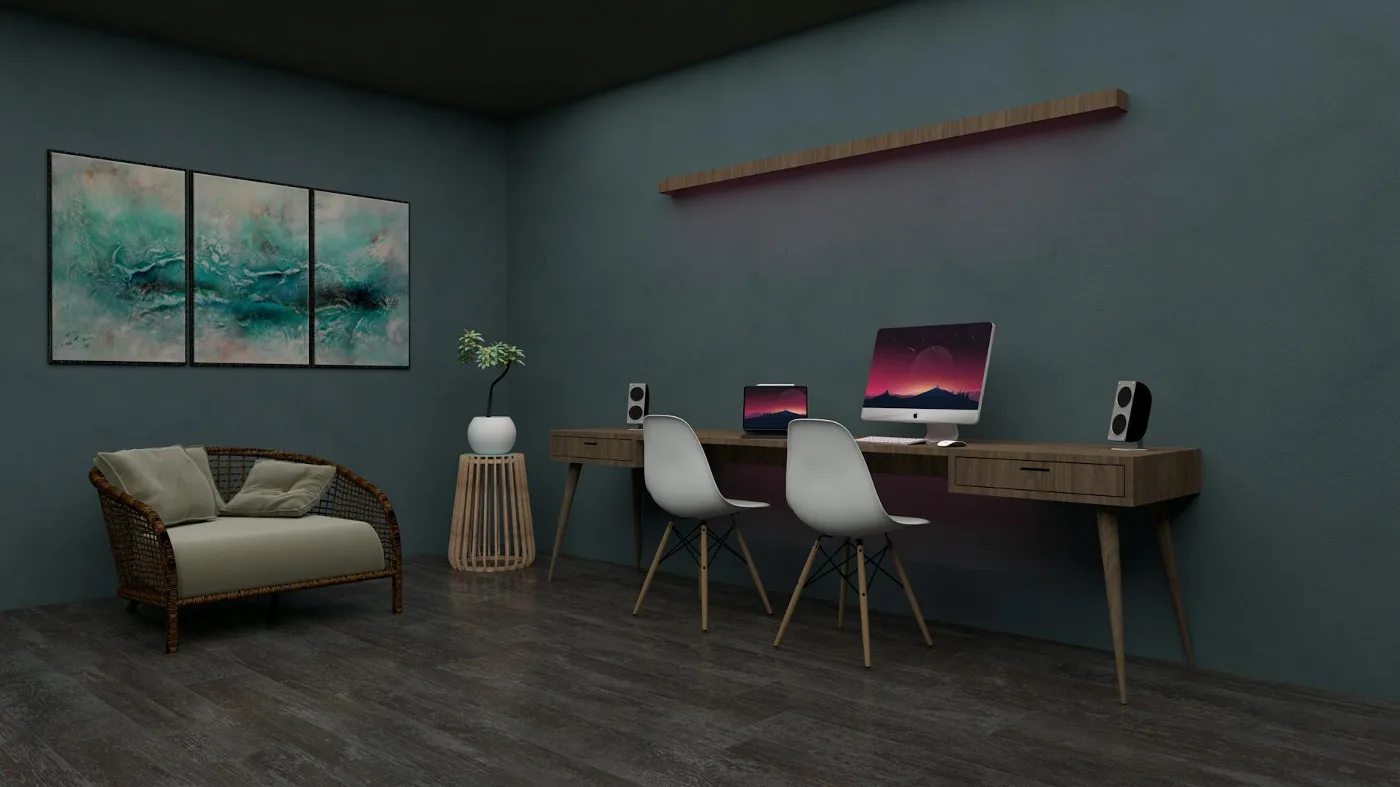
A two person computer desk is the right choice when two people need to work side by side without constantly competing for surface area, outlet access, or elbow room. The best versions do more than simply stretch wider; they create a workable shared station with enough depth, sensible cable routing, and a layout that suits the way the desk will actually be used. desk computer hutch offers more detail on this point. how to choose the right desk size offers more detail on this point.
That distinction matters. A long table can hold two laptops, but it may not feel comfortable for two full work setups with monitors, keyboards, notebooks, lamps, and chargers. A true shared computer desk should help each person stay organized, reduce friction, and fit the room without overwhelming it.
When a two person computer desk makes sense
This type of desk is most useful when two people need a consistent workspace in the same room. It works especially well for:
- couples sharing a home office
- siblings or roommates using one study area
- parent-and-child homework stations
- hybrid workers who need a coordinated setup
- small teams creating a shared work corner at home
The setup is less about style and more about daily rhythm. If both users are on video calls at the same time, need separate peripherals, or prefer a dedicated spot for papers and accessories, a thoughtfully planned shared desk can feel far more efficient than two smaller desks squeezed together. best desks for small offices offers more detail on this point.
It is less useful if both users need frequent privacy, very different equipment, or highly individualized ergonomics. In those cases, two separate desks may offer more flexibility, even if they take up more visual space.
Start with the desk layout, not the finish
The most common mistake is choosing a desk for how it looks before thinking about how it will function. For a shared workstation, the layout matters more than decorative details.
Linear desk
A long straight desk is the simplest option. It gives both people one continuous work surface and usually fits best against a wall. This layout suits laptops, monitors, and straightforward setups. The trade-off is that it can feel less private if both users need separate zones.
Split or divided workstation
Some two person desks use a central divider, shelf, or opposing work zones to create clearer boundaries. This can help reduce overlap and make it easier to keep each side organized. The downside is that dividers can reduce flexibility if one person needs extra space for paperwork or creative tools.
L-shaped shared desk
An L-shaped desk can work well when the room corner is available and each user has a distinct role. One side may be better for a computer setup, while the other holds supplies or a printer. This is a good option for rooms that need a more defined division of space, though it may not suit every floor plan.
Two adjoining desks
In some homes, the best answer is not a single unit at all. Two matching desks placed together can create a shared workspace with more flexibility. This can be a smart choice if the users have different needs or if the room may be rearranged later. The compromise is that the setup may not look as seamless as a purpose-built shared desk.
Step-by-step criteria for choosing the right one
If you are shopping for a two person computer desk, the cleanest way to decide is to work through the setup from the ground up.
1. Measure the room and the traffic around it
Desk size is not just about surface width. A shared workstation needs comfortable access from both sides, especially if chairs roll back or drawers open outward. Measure the wall space, nearby doors, and the path people use to move through the room. A desk that technically fits can still feel awkward if it blocks circulation.
2. Decide how much separation each person needs
Some pairs work well with a fully shared surface. Others need a clear boundary to avoid clutter creep. Think about whether each person uses a desktop tower, dual monitors, notebooks, or a docking station. The more equipment involved, the more important it becomes to preserve distinct zones.
3. Match depth to actual equipment
Depth is often overlooked. A desk can be wide enough and still feel cramped if monitors sit too close to the edge or if keyboard space is limited. A deeper work surface usually makes a shared desk feel calmer and more usable, especially when monitors, document holders, or desk lamps are involved.
4. Plan for power and cables early
Cables are one of the biggest pain points in shared desks. Consider whether the desk has grommet holes, rear cutouts, a cable tray, or enough clearance behind it for surge protectors and adapters. Without a plan, cords can tangle quickly and make the desk look busier than it really is.
5. Think about storage as a shared resource
Storage can either solve a problem or create a new one. Drawers and shelves are helpful, but they should not block legroom or force one person to reach across the other. If the desk includes storage, ask whether it is equally useful for both sides or whether one person will end up monopolizing it.
6. Check the frame and work surface for everyday use
A shared desk has to handle more movement, more equipment, and often more weight than a solo desk. Look for a design that feels stable enough for monitors and accessories without wobbling under normal use. The material should also be practical for the setting; a finish that is easy to wipe down can be especially useful in family spaces or busy home offices.
What matters most for shared comfort
Comfort in a two person computer desk is not only about chairs. The desk itself should support a posture that feels natural for both users over time.
Legroom
Each person needs enough space under the desk to sit without feeling boxed in. This becomes even more important if one or both users prefer a footrest, a CPU tower, or a desk drawer beneath the work surface.
Monitor placement
If both people use monitors, the desk should allow screens to sit at a comfortable viewing distance without forcing one user to turn awkwardly. A long, uninterrupted surface is often easier to work with than a cluttered segmented design.
Noise and visual distractions
A shared desk can be productive, but it can also feel busy. If one person takes calls while the other focuses on detailed work, some form of visual separation may help. Even a modest divider or a disciplined layout can make the desk feel calmer.
Ergonomic symmetry
One overlooked issue is that both sides of the desk may not need identical setups. A laptop user and a dual-monitor user will not require the same depth or accessories. The better desk is the one that handles those differences without making either person feel second-class.
Materials and finishes: choose for the room, not just the catalog photo
Material choice affects how the desk looks, but it also influences maintenance, durability, and how the desk handles daily use.
- Wood and wood-look finishes tend to create a warmer, more home-friendly feel and can fit living rooms or bedrooms more naturally.
- Metal frames often support a cleaner, more industrial look and can feel more rigid in a good way for shared setups.
- Laminates and easy-clean surfaces are practical where drinks, paperwork, or kids are part of the picture.
- Glass surfaces can look sleek, but they tend to show fingerprints and make cable clutter more visible, which is not ideal for every shared office.
A common misconception is that a heavier-looking desk is automatically better. In reality, the best choice depends on how permanent the setup is, how the room is used, and whether the desk will need to move later.
Useful features without the clutter
Feature lists can be tempting, but every add-on should earn its place.
- Cable management: especially valuable for dual monitor setups, charging stations, and shared peripherals.
- Built-in drawers: helpful if both users need a place for pens, notebooks, and small accessories.
- Hutch or shelving: useful in rooms where vertical storage matters more than floor space.
- Keyboard trays: only worth it if they do not compromise legroom or create awkward spacing.
- Dividers: useful for privacy, but not necessary if the users prefer an open layout.
More features are not always better. In a two person setup, extra components can reduce flexibility and make the desk feel crowded. The best version usually does a few things well rather than everything at once.
Examples of good fit by use case
Different households need different versions of the same idea. These examples can help narrow the field.
For two laptop users
A simple long desk with a clean surface, basic cable routing, and enough room for notebooks or a printer may be all that is needed. Flexibility matters more than built-in storage.
For two monitor-heavy workstations
Look for a deeper desk with strong support, generous width, and a layout that lets both monitors sit comfortably without crowding the center.
For a study-and-work combo
A desk with partial separation, shelving, or a side storage zone can help one person focus on schoolwork while the other handles office tasks.
For a multipurpose room
Keep the profile simple and the finish versatile. In shared living spaces, a desk that looks tidy from the room side can make the whole area feel less like a permanent office.
Common mistakes to avoid
Many shared desk problems come from small planning errors rather than the desk itself.
- Choosing width without considering depth. A long surface can still feel cramped if equipment has nowhere to sit comfortably.
- Ignoring chair movement. Two chairs need room to pull back without colliding with walls, beds, or each other.
- Overestimating storage usefulness. Shared drawers sound convenient until one person’s items take over the entire system.
- Forgetting cable routing. Without a plan, cords can turn a clean desk into a tangled visual distraction.
- Using a desk that is too narrow for monitor stands. This can make both work areas feel squeezed from the start.
- Prioritizing symmetry over function. Equal-looking sides are nice, but practical differences between users matter more.
Checklist before you buy
Use this as a quick decision filter before committing to a two person computer desk:
- Does the desk fit the room with room to walk around it?
- Will both users have enough legroom?
- Is the surface deep enough for the equipment you already use?
- Is there a sensible place for power strips and cables?
- Does the layout support privacy, or is openness the goal?
- Will the storage help both users, not just one?
- Is the finish appropriate for the room and the amount of cleaning you want to do?
- Would two separate desks work better if the users need very different setups?
Alternatives worth considering
A two person computer desk is not the only solution for a shared workspace. Depending on the room, these alternatives may be better:
- Two separate desks: best when each person needs more independence or different equipment.
- A long table with organizers: workable for light use if you want a simpler look and maximum flexibility.
- Wall-mounted surfaces: useful in very small rooms where floor space is tight.
- One main desk plus a secondary side table: helpful when one person needs a full workstation and the other only needs occasional access.
The right answer depends on how often both people use the space at once. If the overlap is occasional, a lighter setup may be smarter than a fully built shared workstation.
Choosing with the future in mind
The best shared desk is usually the one that can adapt. Work habits change. One person may add a second monitor, switch from laptop to desktop, or need more paper storage later. A desk with some flexibility tends to age better than a tightly optimized layout that only works for one phase of life.
That is why a two person computer desk should be judged less like a decorative furniture piece and more like a shared system. If the dimensions, surface depth, cable strategy, and storage all work together, the desk can make daily routines feel noticeably easier. If even one of those parts is off, the whole setup can feel cramped no matter how attractive it looks.
For most buyers, the smartest choice is the one that stays organized under real use, supports both users without friction, and fits the room without turning it into a hallway obstacle. That balance is what separates a workable shared desk from one that only looks good in a photo.